HealthConnect
(2024 • 5 Weeks)
Team
Olivia Steed, Fathima Tabassim
Role
UX/UI Design + Research


A centralized hub of patient information for seniors, providing an accessible method of viewing official health records.
HealthConnect is a centralized hub of patient information, providing an accessible method of viewing official health records including health conditions, medications, and appointments all in one place. Supplementary information helps you understand condition outcomes and medication method, and appointment notes keep health guidance available on-demand.
↳ the client.
The Brief
The team was tasked with the challenge of designing an assistive app for seniors over the age of 75. The team began the process by identifying the intended target audience, concluding that seniors aging in place would become our main group of users.
Key Features Developed
In the course of 6 weeks, I collaborated with a team of two designers to develop an assistive app for seniors (over the age of 75) aging in place. The final app developed offers three main features:
01. The Health Information Hub
02. The Medication Tracker
03. Setting Doctor Appointments
Methods of Evaluation
1. User interviews to identify pain points in specific user flows
2. Usability testing in developing app prototype
3. Heuristic evaluations
4. Think aloud testing to develop a user onboarding process: Step-by-step tutorial
“When you get a new drug you always get a huge fold out about the risks, but you never get anything about how it will impact your lifestyle. I’ve been left wondering how to manage and they never really give you lifestyle information at a pharmacy.”
— senior (Participant 01) explaining her struggles to obtain reliable health information
How might we create an accessible method of receiving guidance on current health conditions, medication prescriptions, and guidance in handling medication in order to help seniors aging in place live confidently?
↳ framing the problem to design an appropriate solution.
↳ our solution.
A Gap in the Healthcare System
When elderly patients understand their conditions, medications and prognosis, they experience better health outcomes and reduced anxiety, yet unfortunately many do not have this luxury. Healthcare providers are the primary source of health information for many seniors, with interactions providing comfort, but not all patients receive the support they need, and report anxiety and stress because of it. Elderly patients need another way to access reputable health information, and visualize their health profile to empower them to manage their health and remain independent.

The Significance of Independence for Seniors
A majority of seniors want to age in place, as this allows a greater sense of autonomy and increases physical and mental well-being. The desire to remain independent, even when health made it difficult, means seniors are adding health tracking and maintenance technologies to their condition management plans.
“The majority of B.C. seniors want to live in their own homes for as long as possible. Currently in B.C., 94% of people aged 65 or older live independently. At age 85 or older, almost three-quarters (72%) of B.C. seniors still live in their own home.”
— Senior's Advocate BC, 2019
Key Features of HealthConnect
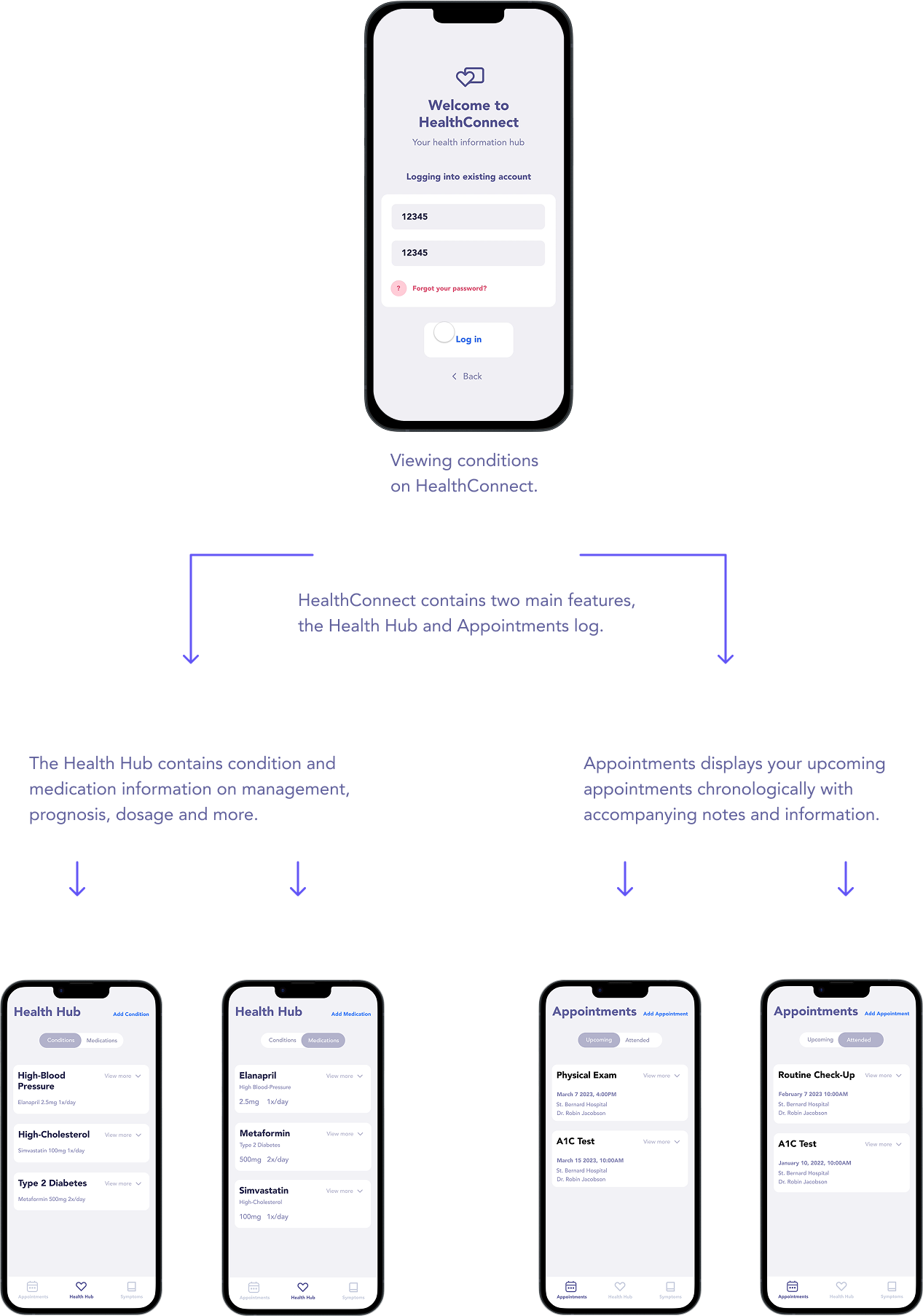

A Centralized Hub of Patient Health Information
HealthConnect enables patients to view official health records, including conditions, medications and appointments all in one place, automatically. Supplementary information helps you understand condition outcomes and medication method, and appointment notes keep health guidance available on-demand. It’s healthcare without the unknowns.

Centralizing Medical Information to Support Independent Living
HealthConnect automatically loads your condition and medication data so you have an up to date overview of your health profile all in one place.
Services include:
1. conditions and medications details
2. chronological appointment schedule
3. medication dosage and prescription
4. prescription refill reminders
5. condition management checklist
6. appointment reminders

Increasing Understanding with Health Conditions to Ease Anxiety and Relieve Stress
HealthConnect provides additional information about medications and conditions so you understand exactly what is going on and how to take care of yourself.
“I found that by understanding the nature of disease and its progression, I was prepared for what would happen next. There's not as much stress. If I know it's coming, I don't go, oh, what does that mean? You're prepared…”
— Wang et al., 2019
Physician-approved Health Care Tracking
In addition to contextual information, HealthConnect provides a list of condition management activities approved by the patient's physician to make keeping track of care activities easier.

Medication Refill Reminders
Enable notifications to refill a prescription at a selected time interval to reduce the memory stress of multi-medication management.
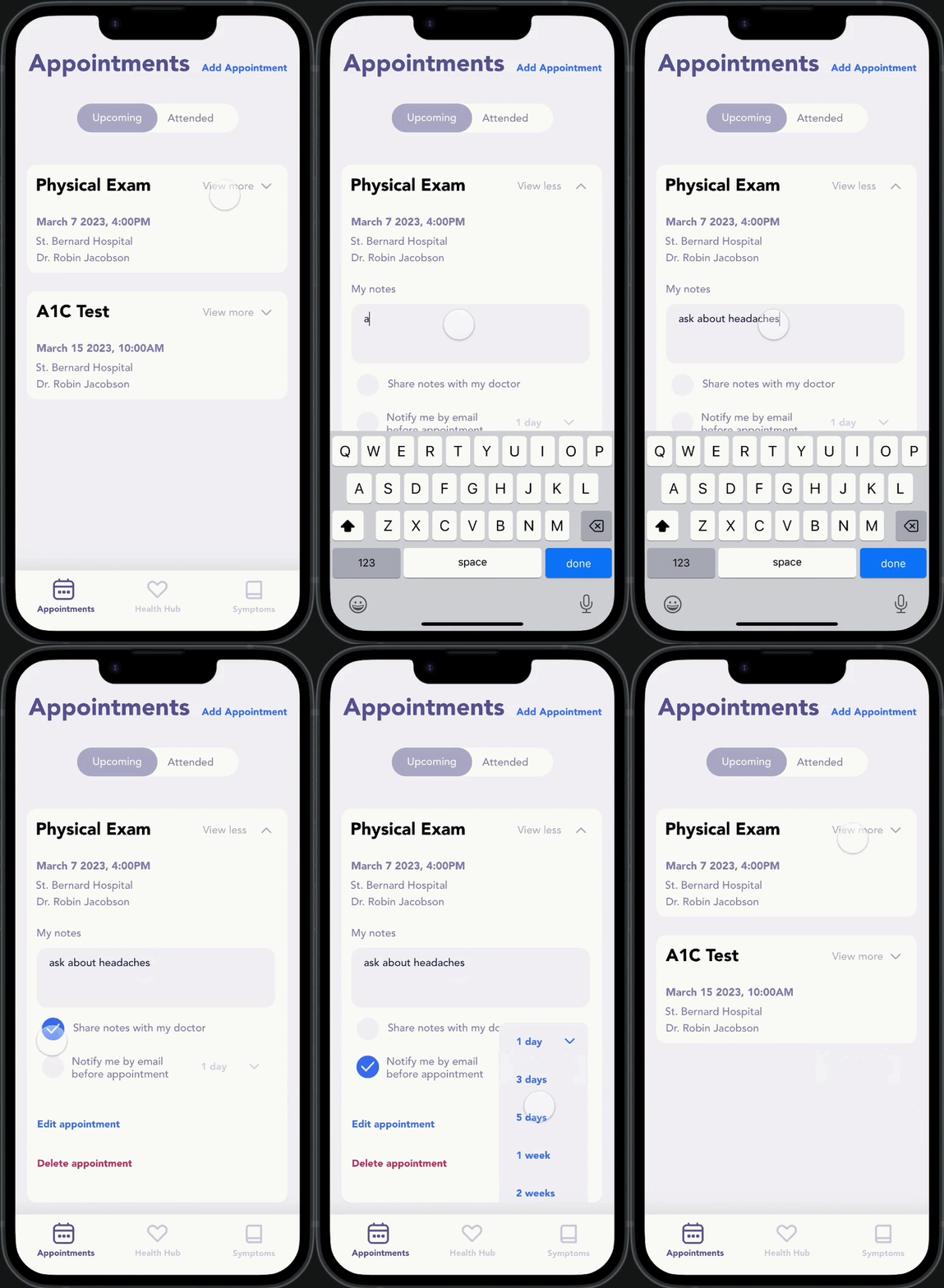
Keeping Up With Appointments
All medical appointments appear chronologically making them easy to overview and remember. Users can set notifications for reminders on when an appointment is coming up.
“Right now I keep all my appointments on sticky notes on my computer, so having them all in one place for all the different doctors would be so easy. It’s hard to use a calendar to remember because they are so far in advance.”
— senior explaining difficulties in keeping track of medical appointments
Building Confidence for Seniors Aging in Place to Reclaim Autonomy in Health Management and Independent Living.
When asked about their attitude towards technology, participants responded with unease regarding their confidence of usage.
“It scares me cause I can’t figure out how it works. I would like to use it more.”
“I experience forgetfulness and lack of understanding.”
“I face some barriers because of fatigue and brain-fog”
— participants voicing their fears in interacting with technology
A key insight from these responses is the lack of guidance for seniors when introduced to new technology. To address the lack of assistive onboarding process, I took lead in developing a tutorial for new users and those looking for a quick review of key features in the app.

Secondary research [ seniors aging in place ]
The team conducted secondary research into the topic of aging in place, and what this would mean for seniors in terms of healthcare and their mental and physical well-being. Main findings were that seniors are willing to learn how to use modern technology, but they struggle to keep up with the fast-paced advancements.
User interviews [ in-person and online ]
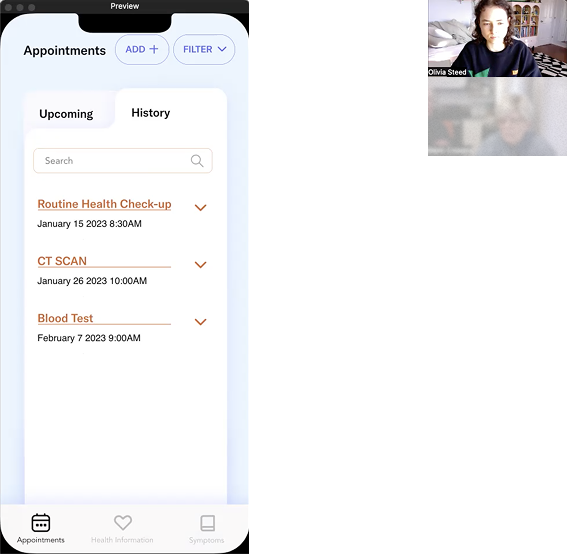
The team conducted an initial round of interviews with our target audience: seniors over the age of 75, and are aging in place. The interviews took place both in-person and online through zoom video calls. The main findings is that seniors are very hard on themselves with regards to their ability in using technology. They are especially harder on themselves when they make mistakes while using their devices, often making themselves feel less capable of performing seemingly basic tasks.
Usability testing [ prototype iterations ]
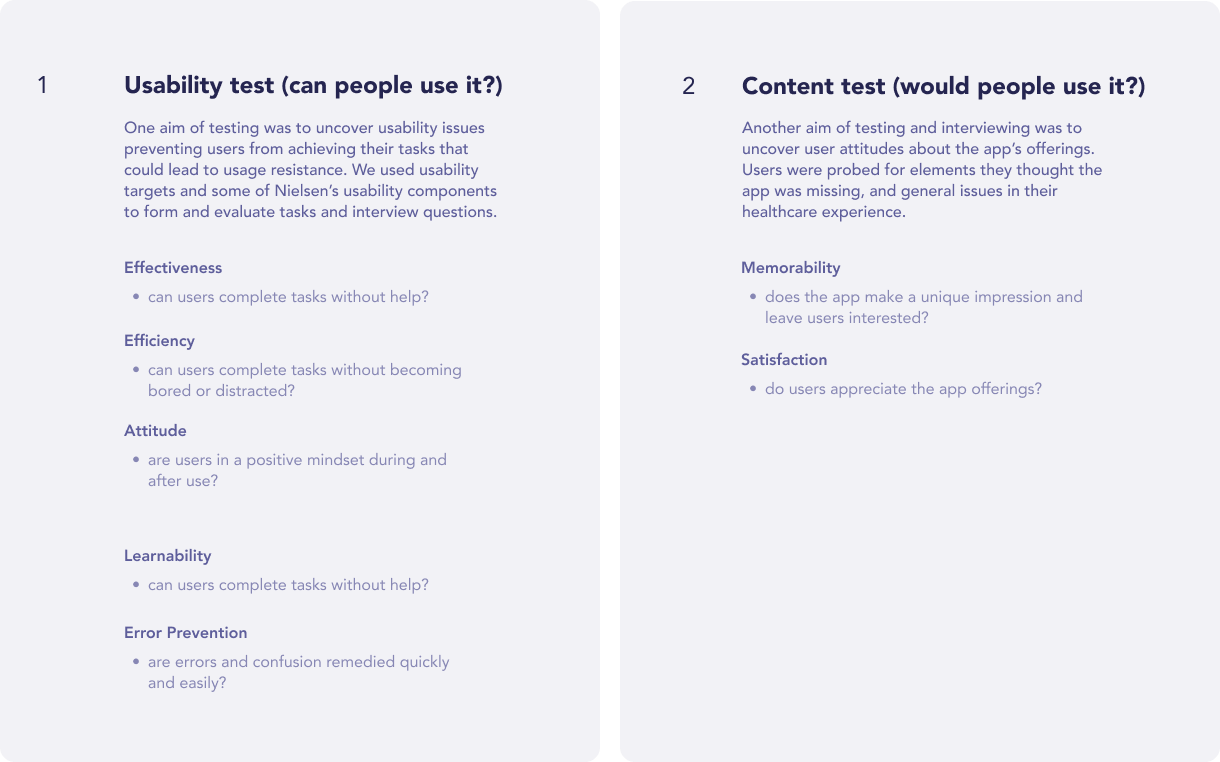
We contacted the same users that we initially interviewed to go through a series of usability tests. The main finding that we got through this is that the overall visuals of the app was very inconsistent. Users also mentioned that the visual cues of interactive elements are not very clear, and components within the layout did not have enough contrast with each other whihc made it difficult to focus visually.
Heuristics evaluations
The team conducted a heuristic evaluation of the prototype and identified key issues such as clarity of content leading to confusion with purpose of the app. Other important heuristic violations were lack of interactions and explanation of features within the app.
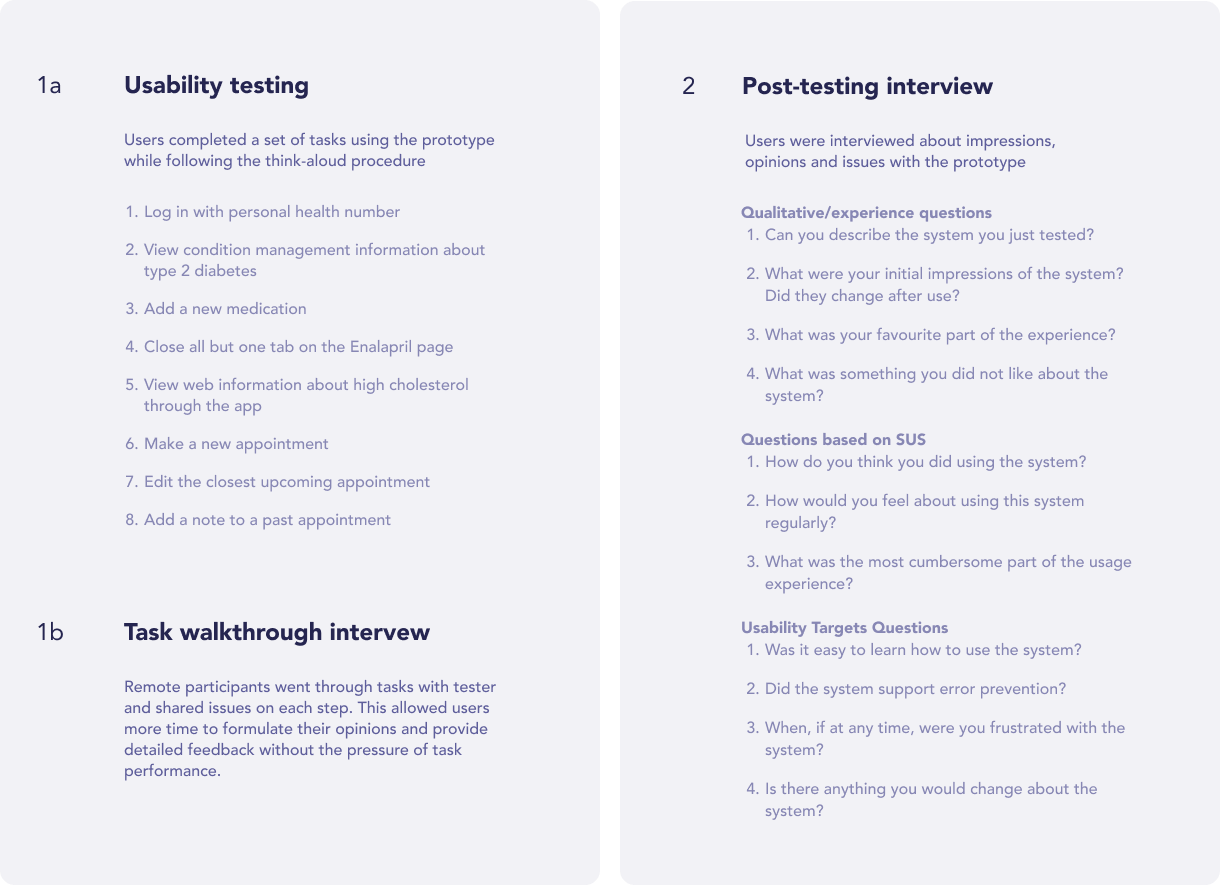
Follow-up user interviews [ in-person and online ]
We concluded from the second user-interviews and usability testing that seniors aging in place high importance in knowing that the information they are getting is trustworthy, followed by the accessibility of these information.
Our findings also confirmed our initial secondary that seniors tend to be more hard on themselves when judging their abilities in using technology.
Think-aloud walkthroughs of the app's main functions
Our group compiled usability questions and conducted a series of activities that we had our users perform to see how they navigate through our app. Through this we were able to see that users had toruble with the small text sizes and inconsistent use of colors throughout the app.

The results of our think-aloud walkthroughs show that users had a hard time navigating the app, specifically with adding new medications or conditions. We realized these features were designed as 'hidden features', with little to no visual cues or indication that can be interacted with. This became our priority in the next iterations as we improved the visual clarity with interactive components, as well as adding a tutorial process for going through the main features of the app.
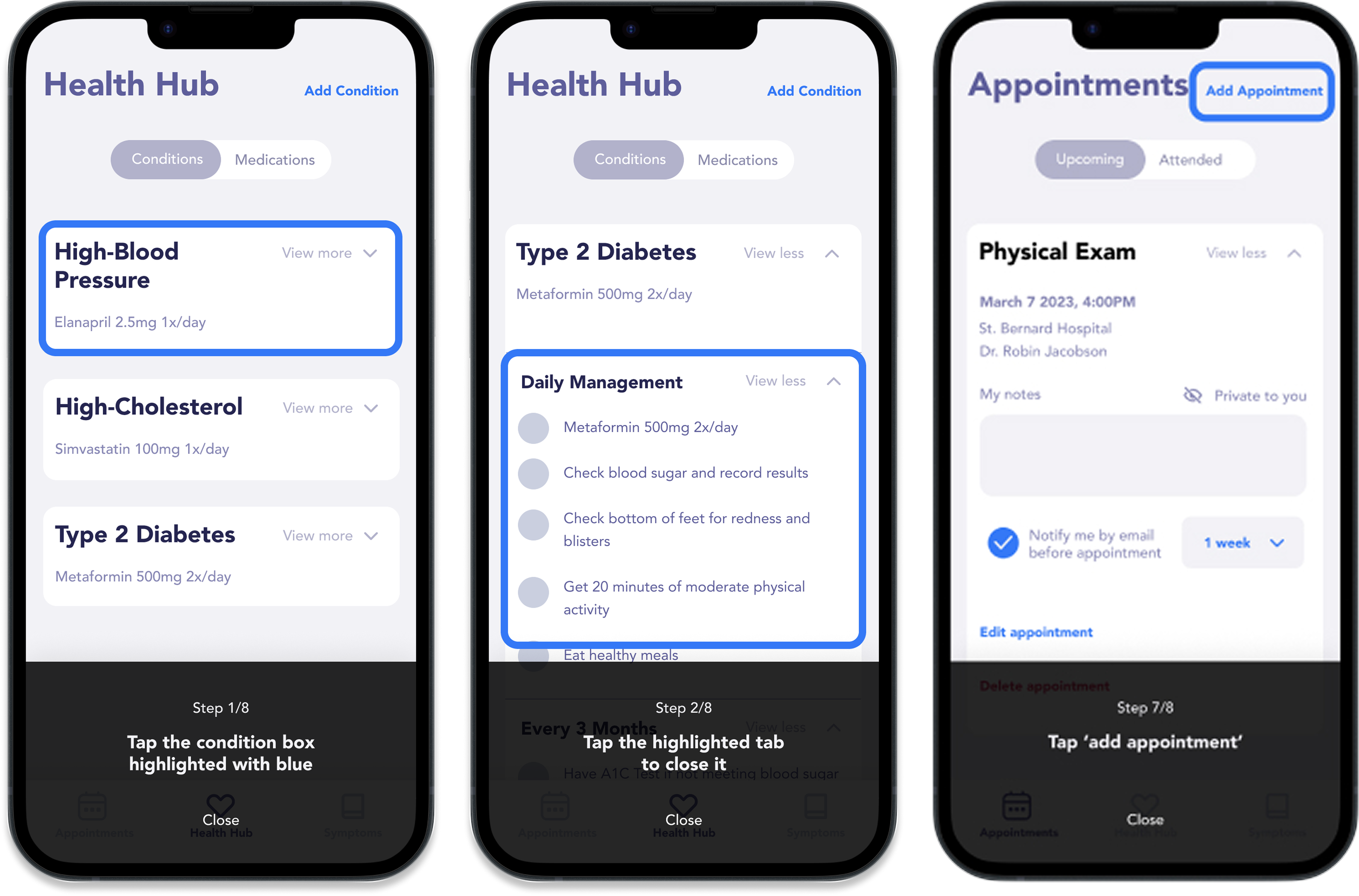
The final onboarding process consist of the account creation or linkage of personal health insurance number for accessing personal medical records. Upon arriving in the homepage, a pop-up message introducing the guided tutorial is displayed, informing users of the existence of this tool that could help them learn the app's main features.
↳ case study results
Guided Tutorial of Key Features
The tutorial covers how to navigate through key features such as tracking health condition and medications, and accessing appointment details.
Helping seniors aging in place to live independently with confidence.
The final design and feature of the app reduces stress and anxiety from uncertainties in users' ability to navigate through the app. The implementation of a tutorial educates seniors in a forgiving manner without deterring seniors from engaging with technology after comitting mistakes. This also results in increased knowledge with main functions of the app, helping seniors to gain abetter understanding of their current health conditions and how to better manage their health.
Through this project I learned new methods of user research, helping improve my approach to design and the reasoning of my decisions. The most valuable takeaway that I gained would be the idea of a 'user-centered design', and how important it is to first know who you are designing for and what their needs are.
This 7-week long case study helped me understand the importance of a user-centered design, putting the users first before to design a solution that addresses the needs of these specific users. I learned that through first-hand research and interviews of stakeholders, the design becomes more meaningful as their own experiences and struggles with normal life problems become the foundations into the final solution.
The overall process of this project was very enjoyable as I was able to experience different methods of user-research and data analysis to gather insights that would help me create informed design decisions. This understanding and support from user research data helped me choose the most appropriate design solutions to create a tool that would help solve the identified problems.
↳ reflection.
